AI Writing Assistant: From One Sentence to a Perfect Article for Beginners
Why AI Writing Is the Most Important Skill for Ordinary People to Master
Have you ever found yourself staring at a blank document, unable to write? Can't come up with a title, spend ten minutes struggling with the first paragraph, squeeze out the middle content like toothpaste, and rush through the ending? You have ideas in your head, but they get lost when you try to put them on the screen.
Writing has long been considered a talent for the few. But now things are different. AI writing assistants have turned writing into something everyone can do. You just need to tell it what to write, and it can help you through the entire process from brainstorming to final draft. It's like having a writing partner who never gets tired and never gets stuck.
This article will guide you from scratch, teaching you how to write great articles with AI. No writing background is required—just the ability to type and ask questions.
What Exactly Is AI Writing Doing for You?
Many people misunderstand AI writing, thinking it's just "one-click to generate an entire article." In fact, the best way to use AI for writing is you act as the director, and AI acts as the execution team. Specifically, AI helps you save significant effort in three areas:
1. Organizing Your Thoughts
The biggest obstacle in writing is often not "not knowing how to write," but "not knowing what to write about." You have a jumble of ideas in your mind but don't know how to organize them. AI can help turn those fragments into a clear outline. Just name a topic, and it will list a reasonable article structure, telling you what to write in each section.
2. Writing the Content
Once you have an outline, you can let AI write section by section. Give it a heading, and it produces a complete paragraph; if you think a paragraph isn't good enough, ask it to rewrite; if you want a different expression, it can provide multiple versions. This process feels like discussing with a writing partner in real time, rather than fighting alone.
3. Improving Quality
After the first draft is done, let AI act as your editor: check for logical flow, language fluency, redundancy, and whether the tone matches your target audience. This step elevates your work from "just getting it done" to "writing it well."
Step-by-Step Tutorial: Write Your First Article in 5 Steps
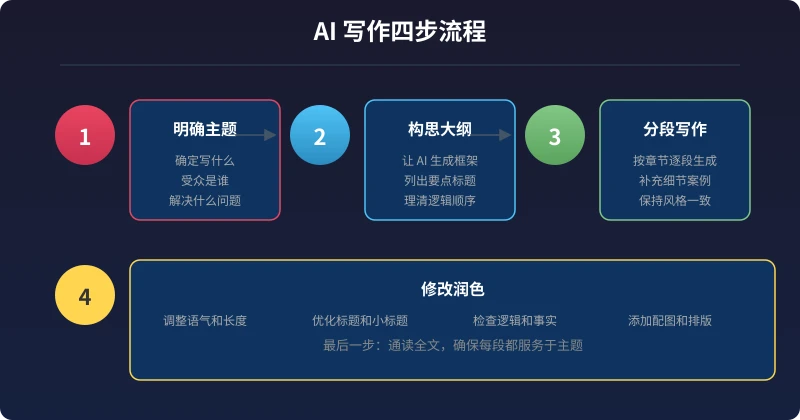
Step 1: Determine What You Want to Write
Before you start, ask yourself three questions:
- What is the topic? For example, "How to take good photos with your phone" or "How to learn a foreign language efficiently."
- Who is the audience? Beginners? Peers? People in a specific industry?
- What problem does it solve? What will readers gain after reading?
Don't overthink it—having a general direction is enough. AI will help turn vague ideas into concrete content.
Step 2: Let AI Generate an Outline
This is the most critical step. Don't ask AI to write the full article right away; first, have it generate an outline. You can ask like this:
"I want to write an article about [topic] for [audience]. Please generate a detailed outline, including the main title and subheadings for each section. Under each subheading, briefly describe what content to include. The article should be around 1500-2000 words."
Once you have the outline, you can adjust it: delete sections you think are unnecessary, add parts you consider important, and reorder the sections. The outline is your "battle map" with AI—the clearer it is, the easier the writing will be later.
Step 3: Write Section by Section
With the outline set, start writing section by section. Only ask AI to write one section at a time—don't try to do too much at once. Use prompts like:
- "Please write the content for Chapter 1 [title], about 300 words, in a conversational tone suitable for general readers."
- "Add a specific example to this paragraph."
- "Rephrase it in a more down-to-earth way."
After finishing one chapter, review it. Only when you're satisfied, ask AI to write the next chapter. This way, the article will have clear logic and quality in every part.
Step 4: Add Your Own Voice
This is a crucial step that many people overlook. AI-generated content can be good, but it lacks your personal touch.
After each section is generated, take a minute to read it and ask yourself:
- Is there any sentence that doesn't match my thinking?
- Is there any personal experience or opinion I want to add?
- Does the tone sound like how I normally speak?
You can manually edit, or ask AI to adjust: "Rewrite this paragraph in a more conversational style, like chatting with a friend." After adding your own content, the article truly becomes yours.
Step 5: Let AI Do the Final Polish
After the entire article is written, do one final polish. Send the whole article to AI and say:
"Please review this article for the following issues: illogical parts, redundant paragraphs, inconsistent tone, and missing transitions. Point them out one by one and give revision suggestions. Don't rewrite directly—just list the issues first."
Then revise based on the issues AI identifies. This step can elevate the quality of your article to the next level.
Three Ready-to-Use Prompt Templates
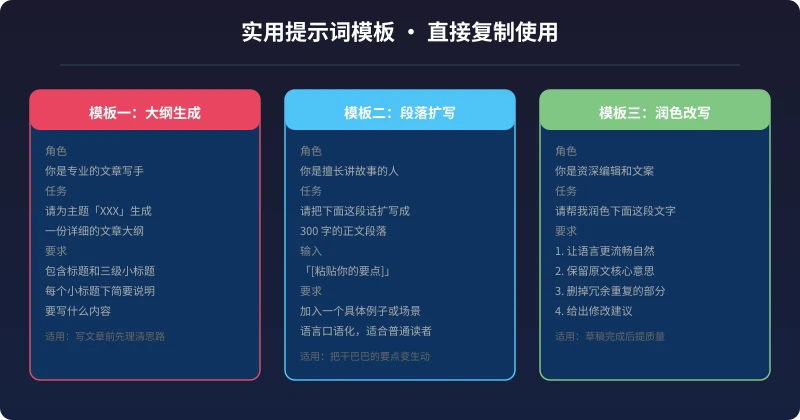
Template 1: Generate Article Outline
"You are a professional article writer. I want to write an article about [topic] for [audience type], around 1500-2000 words. Please generate a detailed outline, including the main title and three levels of subheadings. Under each subheading, briefly describe in one or two sentences what content to include. Ensure logical flow, clear structure, and suitability for general readers."
Template 2: Expand a Paragraph
"You are a good storyteller. Please expand the following key point into a paragraph of about 300 words:
[paste your key point]
Requirements: include a specific example or scenario to make it easier for readers to understand; use conversational language, not academic; maintain a positive and practical style."
Template 3: Polish and Rewrite
"You are a senior editor and copywriter. Please polish the following text:
[paste your paragraph]
Requirements: 1. Make the language more fluent and natural 2. Keep the original core meaning 3. Remove redundant parts 4. Provide specific revision suggestions."
Avoid These Common Pitfalls
Don't Put All Your Hope in AI
The worst usage is: "Write an article for me." This usually produces hollow, formulaic, soulless content. The right way is: you provide the direction, material, and viewpoints, and AI helps you organize, express, and optimize.
Don't Generate the Full Article at Once
Asking AI to generate a 2000-word article all at once usually yields lower quality than generating it in five sections. Generating section by section allows you to intervene and adjust at each step, resulting in a better final product.
Don't Skip Fact-Checking
AI might fabricate data or cite non-existent cases. If your article involves specific numbers, technical terms, or real examples, make sure to verify them yourself. AI is an assistant, not an authority.
Don't Skip Human Review
AI-written drafts may have obvious logical gaps or sections that go off-topic. No article should be published without human review. Treat AI output as a draft, not a final product.
Scenarios Where AI Writing Excels
Not all content is suitable for AI writing, but the following scenarios are particularly well-suited:
- Tutorials and guides: Content with clear steps and logical flow—AI handles this well.
- Knowledge summaries: Organizing scattered information into structured articles.
- Product introductions: Feature descriptions, usage tutorials, and similar content.
- Daily records: Reading notes, weekly work reports, life reflections.
- Emails and copy: Cover letters, email replies, social media posts.
For highly personal content—such as your experiences, your opinions, your stories—AI can assist but cannot replace you. The best writing model is you provide the soul, AI provides the skeleton.
Conclusion
AI writing is not about replacing you; it's about helping you write faster and better. Its value lies in greatly simplifying the hardest part—going from a blank page to a first draft—so you can focus your energy on the most valuable aspects: thinking, judging, and expressing your own ideas.
Starting today, try letting AI help you write a short article. It could be study notes, a product usage experience, or a life reflection. You'll find that writing isn't as hard as you imagined.
The best way to use AI for writing is always you lead, AI supports. Master this principle, and you can turn AI into your most powerful writing partner.
相关文章
AI 帮你写简历:从零到专业,五步搞定求职利器
不管你是应届生还是职场转行,AI 都能帮你把简历从"凑合能用"变成"眼前一亮"。本文用五个步骤,手把手教你用 AI 生成、修改、优化出一份真正能拿面试的专业简历。
效率工具AI 帮你整理笔记:收集、归档、回顾,五步建立个人知识系统
笔记越来越乱,写了等于没写?本文教你用 AI 把会议录音、阅读摘录、灵感碎片一键整理成结构化知识库,五步建立从收集到回顾的完整笔记系统。
效率工具AI 帮你做副业规划:找到适合你的第二收入来源
想用副业增加收入,却不知道从哪里开始?AI 能帮你分析技能、匹配方向、制定计划、跟踪执行。零基础也能在一个月内找到适合自己的副业路线。
评论功能暂未开放,敬请期待